
Ghost CMS Dropdown Menus

Ghost CMS supports only single level horisontal menu, which is managed under Navigation section in the admin portal. The trick is to somehow mark different levels and then render it using the navigation.hbs template.
Here is a working example from our website:
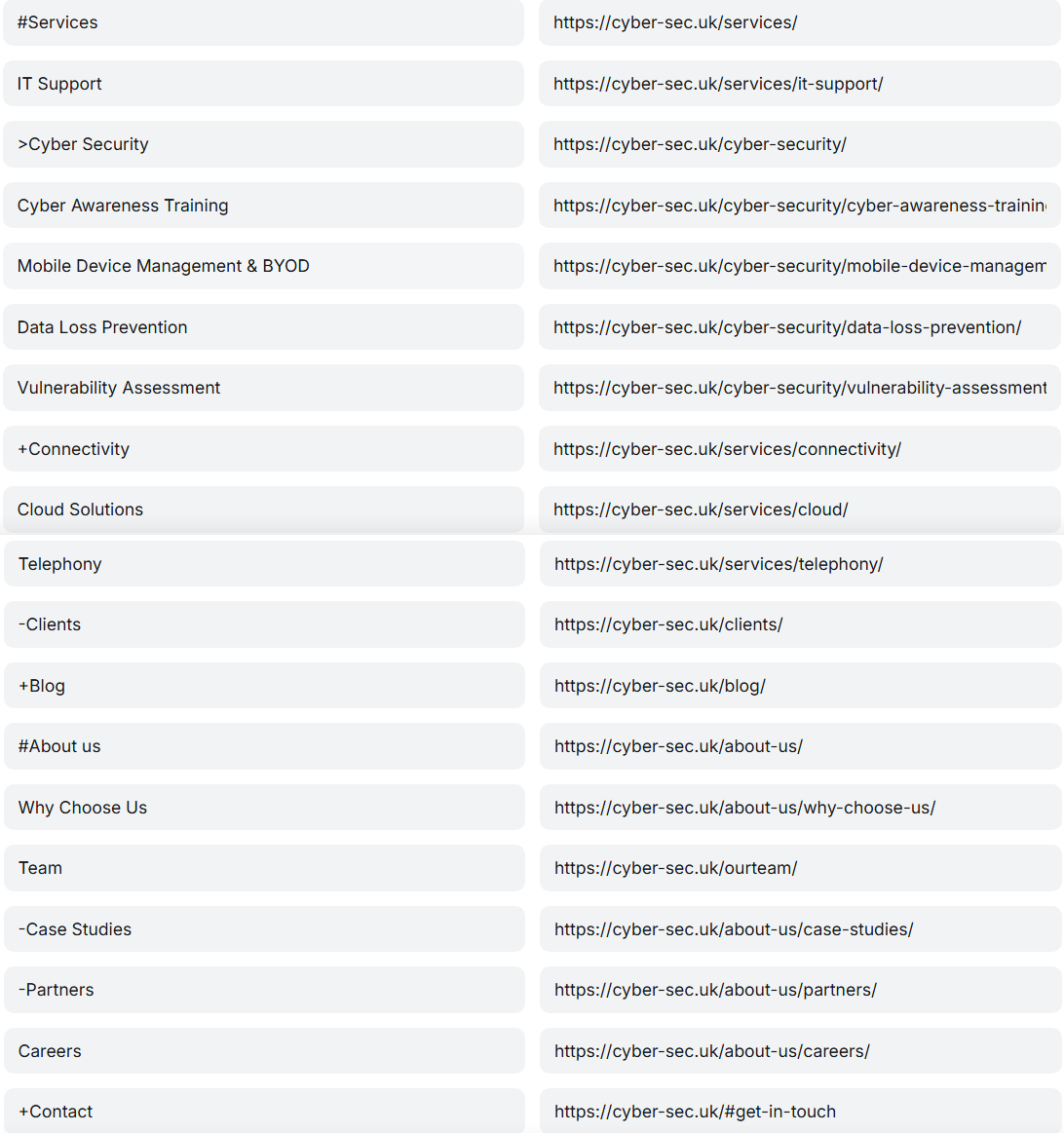
Notice the use of special characters:
#- marks a beginning of a drop down menu.
> - marks a beginning of the right side expanding menu.
+ - marks the end of both vertical drop down and right side expanding menu.
- - it can be used to hide menu entries if you have unfinished pages.
And here is the navigation.hbs template code to render it all:
<ul class="nav links">
    {{#foreach navigation}}
        {{!-- Submenu parent --}}
        {{#match label "~^" "#"}}
            <li>
                <a href="{{url}}"> {{#split label separator="#"}}
                        {{this}}
                    {{/split}}</a>
                <i class="bx bxs-chevron-down arrow htmlcss-arrow"></i>
                <ul class="nav sub-menu">
        {{!-- Closing the menu --}}
            {{else match label "~^" "+"}}

                        </ul>
                    </li>
                 <li> <a href="{{url}}"> {{#split label separator="+"}}
                        {{this}}
                    {{/split}}</a></li>
            {{!-- right menu --}}
            {{else match label "~^" ">"}}
            <li class="more">
                <a href="{{url}}"> {{#split label separator=">"}}
                        {{this}}
                    {{/split}}</a>
                <i class="bx bxs-chevron-right arrow more-arrow"></i>

                <ul class="nav sub-menu more-sub-menu">

                {{!-- hide entry --}}
                {{else match label "~^" "-"}}
                {{else}}
                    <li> <a href="{{url}}">{{label}}</a></li>

        {{/match}}

    {{/foreach}}
</ul>
I am not covering the menu CSS here, as long as you properly render your ul il table any type of drop down menus CSS will be compatible.
Please get in touch if you need any help with it.